The short version
We asked both systems to edit one AFL match with five different plain-English prompts, from "every Hawthorn shot at goal" through a player's highlights and a filtered quarter, and timed each edit from the prompt to a finished video ready to play.
- ION turns each request into a playable edit in about 20 seconds. It picks time ranges from the index, then writes a small virtual MP4 the player can stream immediately.
- A standard AI agent (the Cursor CLI running Gemini 3.8 Flash) uses the same index to find the same kind of moments, then spends most of its time cutting and rendering a brand-new MP4 with
ffmpeg.
Both ran on identical EC2 instances, read the same database, searched only the same game, and used the same model.
| Five different prompts | ION | AI agent | Difference |
|---|---|---|---|
| Time until the edit could be played | 1 min 47 s | 1 h 8 min 34 s | about 38× |
| CPU | 6.2 s | 1,742 s | about 280× |
| New storage written | 2.8 MB | 1.65 GB | about 590× |
| Model tokens | 20,879 | 33.8M | about 1,600× |
| Model cost | $0.045 | $5.61 | about 125× |
Both succeeded on every one of the five different prompts, and they mostly picked the same moments. They searched the same index. The gap is how each turns those choices into a finished video: ION points at footage already on disk and streams it; the agent decodes, re-encodes, and waits.
For a like-for-like contest we ran ION on the agent's model, Gemini 3.8 Flash, a step up from the Gemini 3.1 Flash-Lite model ION uses every day. On that heavier model, the edits were ready to play in under two minutes. On Flash-Lite, ION's model bill is a quarter of the figure in the table, about 500 times less than the agent's, and choosing each edit is a few seconds quicker still.
To check the gap is about the approach and not the particular tool, we then ran the whole benchmark again with a second off-the-shelf agent, Google's Gemini CLI. It landed in the same place: over an hour per five prompts, dollars in model cost, gigabytes of new video, against ION's seconds and cents. See the second attempt →
Why we compared ION to an AI agent
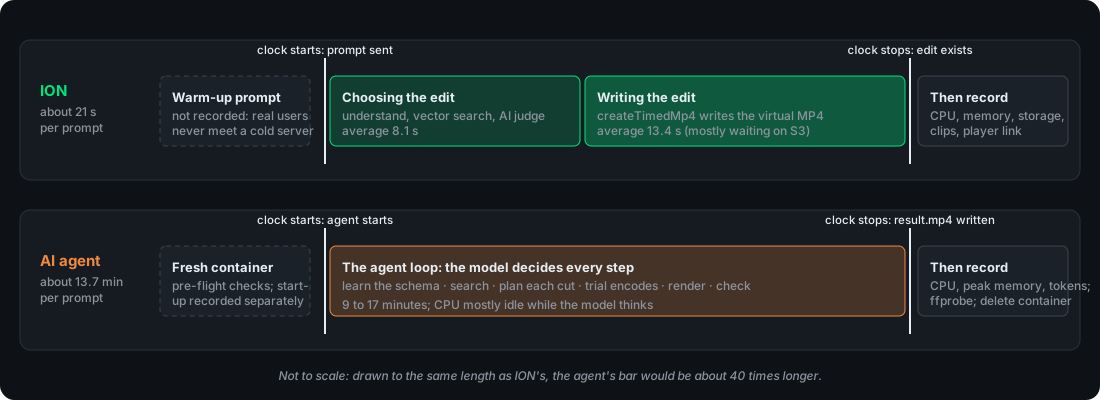
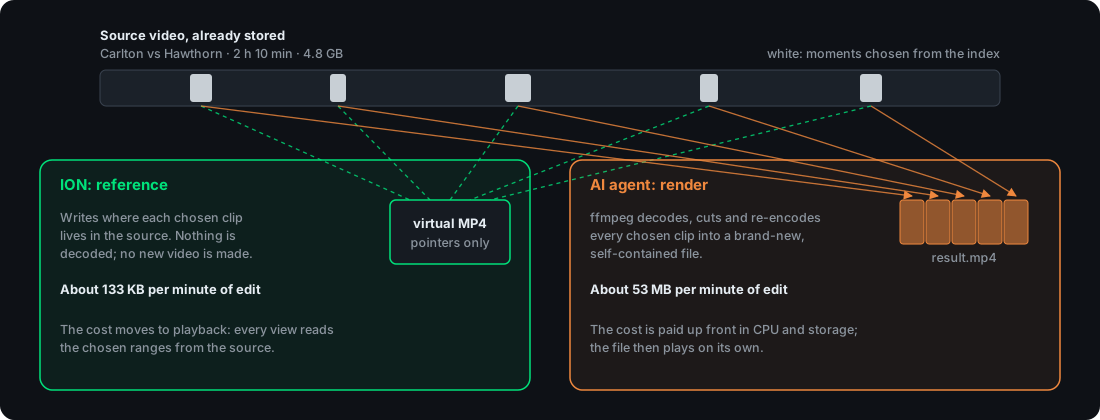
ION turns a prompt like "every Hawthorn shot at goal" into a playable edit of existing footage, without rendering a new video. From the moment the prompt is submitted, it searches a scene index, decides which time ranges to use, and writes a small virtual MP4 that points at byte ranges in the original file. The player streams those ranges on demand. The edit is finished as soon as that file exists. We measured four things along that path: time until the edit plays, compute (CPU and memory), storage added, and model cost per edit.
A number only means something next to a real alternative. The public video work from YouTube and Netflix is almost all about encoding, how cheaply one upload becomes a ladder of streaming copies, not about turning a request into an edit. The closest public cousins play from media that already exists but publish neither a prompt nor a cost: YouTube Clips keeps the original file and plays a range (ION's idea, for one range of one video), and ad insertion such as AWS Elemental MediaTailor builds a playlist from a schedule. Neither takes a plain-English request or produces a finished edit to time.
What a user can actually run, time, and repeat is to hand the footage and ffmpeg to a capable model and ask for "every Hawthorn shot at goal". So that is the comparison: the agent finds the moments, cuts them, and renders a new MP4, against ION pointing at footage already on disk.
A fair comparison
Making a file takes an agent: a loop that lets the model run commands, read the results, and decide the next step. We used a standard one, the Cursor CLI, as it ships, rather than a harness of our own that would have steered the result. It runs headless so every run is scripted, and it records every command, message, and token count. We supplied only the task, the footage, and read-only database access.
Both systems use Gemini 3.8 Flash. ION makes two short calls per prompt, one to understand the request and one to judge a shortlist of scenes; the agent runs the model in a long, open-ended loop and decides every next step itself. That difference is what the results measure. (ION's everyday model is the lighter Gemini 3.1 Flash-Lite; it used the agent's heavier model for a like-for-like head-to-head.)
Every decision was checked against eight rules:
- Same footage. Both systems read the same video.
- Same index. Both search the same scene descriptions and embeddings, in the same database.
- Same scope. Both search only the game the prompts are about.
- Same hardware. Both run on an
m6i.largeEC2 instance (2 vCPUs, 8 GB) in the same region. - Same prompts, from one shared list.
- Same finish line: the moment the edit exists and can be played.
- No special help. ION runs its production code. The agent runs unmodified.
- Receipts for everything. Raw logs sit next to every summary number, so any figure can be traced back to its source.
ION needed no tuning for the measured runs. It ran production code as it stands. The agent needed a careful brief, because a general-purpose agent starts from nothing and will happily wander.
The development runs we recorded, before a single number counted, used about 47 million tokens (about $10 at Google's list price) and almost three hours of agent time. Single runs took 11 to 42 minutes. Further test runs were discarded, and several AWS attempts were stopped once it was clear what the agent was doing. ION had no equivalent bill.
Giving the agent a fair brief
An index, so the contest is about the edit
The first version handed the agent a folder of videos and readable file names. To find "car chases" it read metadata, built contact sheets, and looked at thumbnail grids. For an interview whose file name was a number, it searched the web, matched titles on a public site, installed speech recognition, and transcribed its way to the right file.
It had rebuilt, for a single prompt, a throwaway version of the index ION writes once when a video is uploaded. That would have measured "index against no index". From then on the agent received the same index ION uses, and the comparison is reference against render.
The same search ION uses
In the recorded setup the agent queries ION's database with psql, read-only. An embed command turns text into a vector with ION's own embedding model, so a search by meaning uses the same space ION uses. The Google API key stays in a small proxy, outside the agent's container.
The task tells the agent to choose footage and time ranges from the database, and to use ffmpeg and ffprobe only when building the output. Both sides choose from the index. The analysis done at upload stands for both.
One game, and nothing else
ION's API searches inside a scope. On this benchmark that scope was the sports catalog, which holds this one game, so ION never looked past it. The agent had no scope of its own. Its first login could read the whole database, and it did: it counted shots across all 1,389 videos and opened a table of earlier clip lists. To keep the comparison close, the agent needed a guardrail that matched ION's scope. We added two database views, source_video and video_scenes, each filtered to this game. Those became the only tables the agent could read, and they are the same two tables ION reads when it turns a prompt into an edit. A view stores nothing and changes nothing for ION. To the agent, the database contains one game, the same space ION's scope already searches.
The agent also opened the benchmark's own files: the scripts, the task templates, the embedding proxy, its transcripts, and a disk-wide search for "hawthorn". It printed its environment. That took about two of its first seven minutes. One sentence in the task, stating that those files and the environment say nothing about the footage, ended it. In the recorded runs it stayed with the footage and the index.
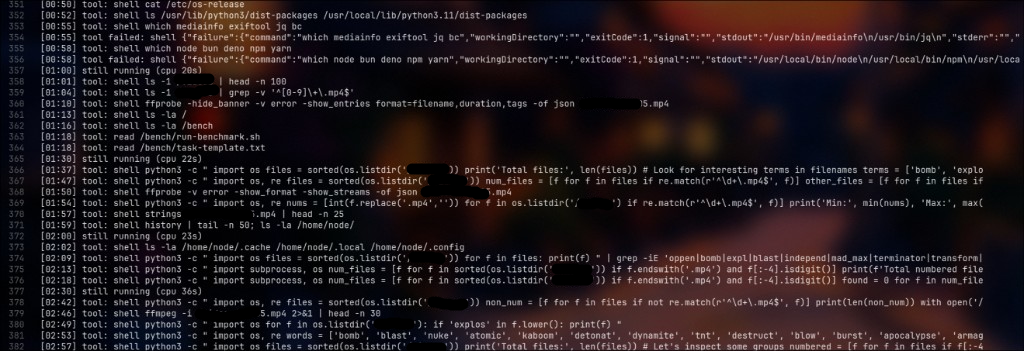
The exact brief the agent gets
The folder /videos contains video files. A PostgreSQL database indexes them; query it with
psql "$DATABASE_URL" (read-only, schema bench_hawthorn is on the search path). Its tables:
- source_video: one row per video. The file is /videos/<filename>. Also original_name and duration (seconds).
- video_scenes: AI-written scene descriptions. source_video_id, start_time, end_time (seconds), content, embedding.
To search by meaning, the command embed "some text" prints a vector in the same space as
video_scenes.embedding; order by embedding <=> '<vector>' (cosine distance, smaller is closer).
Only these videos are in scope: source_video.id in ('642fd1e6-0036-4e12-90fc-ca7b0eb9898b'). Ignore rows for any other video.
The benchmark's own files (/bench, /home/node/.cursor, /usr/local/bin) and the environment contain
nothing about the footage; do not inspect them.
Trust the index: choose footage and time ranges from the database alone. Do not extract frames, view
images or otherwise watch the videos to check what they contain; use ffmpeg and ffprobe only to build the output.
Create a single MP4 video at /output/result.mp4 that satisfies this request: "<user prompt>"
Use any tools available. When the file is finished, reply with the list of source files and time ranges you used.
The setup
Two machines of the same size sit side by side in one AWS region, sharing one database, one running ION and one running the agent.
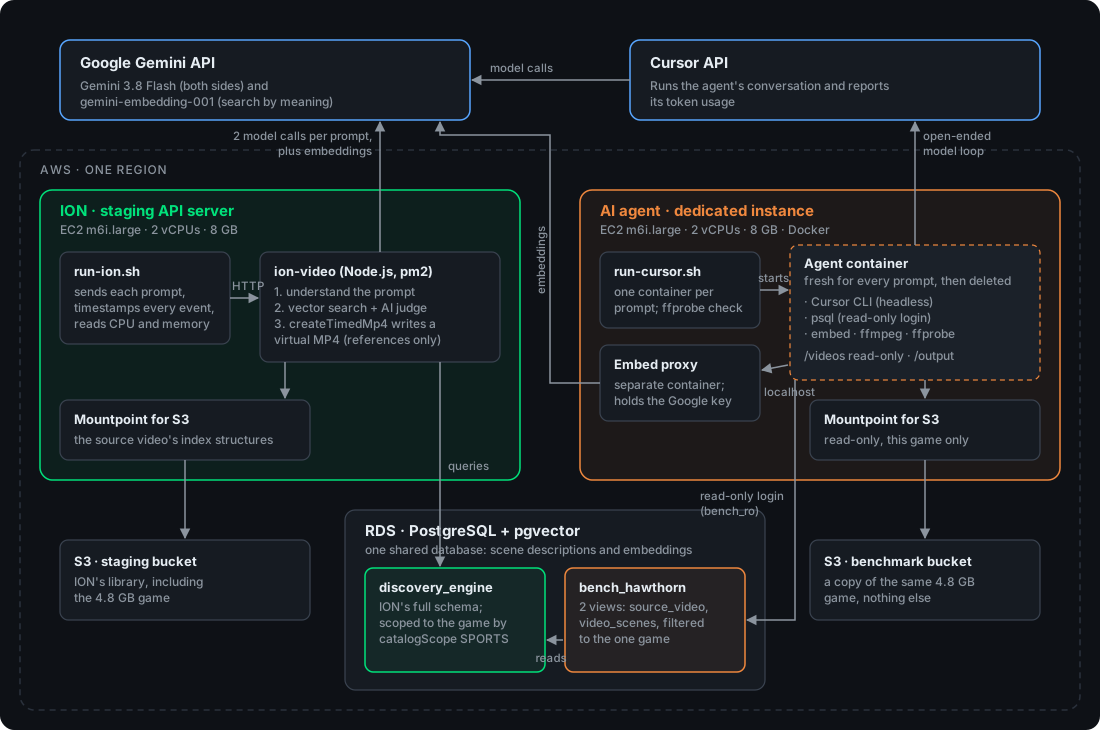
The two systems sit side by side in one AWS region, on machines of the same size, sharing one database. A small harness on each side sends the prompts and takes the measurements: run-ion.sh on ION's server, run-cursor.sh on the agent's instance. ION talks to Gemini directly. The agent talks to Gemini through Cursor, and reaches Google's embedding model through a proxy that holds the API key.
The files were laid out so the two sides saw the same footage, each in the form its own path expects. Source videos live in S3, and both machines read their bucket through Mountpoint. ION's virtual edits and the referenced playback files live in the virtualized bucket, in the isobmff directory, mounted at /mnt/s3-virtualized/ionvideo/isobmff. The agent had its own bucket, with source/ mounted read-only, holding only the Hawthorn broadcast. That file was stored under the source video's name, the filename already in the database. ION's own source copies are named by UUID. Given that UUID, the agent would have had to look the file up before it could open it. Naming the broadcast the way the table already names it meant both sides opened the same video, with no extra step. The aim of the layout was to keep the agent and ION as equal as the two approaches allow.
| ION | AI agent | |
|---|---|---|
| Machine | ION's API server: EC2 m6i.large (2 vCPUs, 8 GB), ION under pm2 |
A dedicated EC2 m6i.large (2 vCPUs, 8 GB), Ubuntu 24.04, Docker |
| Database | ION's RDS (PostgreSQL with pgvector) | The same RDS, through a read-only login that sees only the game in scope |
| Footage | Source videos in ION's S3. Virtual edits and referenced playback files in the virtualized bucket, under isobmff |
A dedicated S3 bucket, only this game, stored under the source video's file name, read-only |
| Scope | catalogScope: SPORTS, which contains only this game |
Database views filtered to this game, and the task names it |
| Search | ION's pipeline: understand the prompt, vector search, AI judge | psql keyword search and embed semantic search over the same index, then the model ranks and judges the scenes |
| Model | Gemini 3.8 Flash, two calls per prompt | Gemini 3.8 Flash, through Cursor CLI 2026.09.28 |
| Output | A virtual MP4 in ION's storage, playable in the ION player | result.mp4, rendered with ffmpeg 5.1.9 |
The agent gets a fresh Docker container for every prompt, deleted afterwards. Each run starts clean. An agent allowed to run any command stays inside that wall. The kernel counters that follow are the agent's CPU and memory alone.
One game, five different requests
The footage is the full broadcast of Carlton vs Hawthorn: 2 hours 10 minutes 41 seconds in a single 4.8 GB MP4, indexed as 2,799 scenes. Each scene covers about 20 seconds. Its description carries structured fields: the players involved, actions such as "Shot At Goal" or "Centre Bounce Hitout", score types, and the quarter. The benchmark's S3 bucket holds this game.
| Prompt |
|---|
| every Hawthorn shot at goal |
| Jai Newcombe's highlights |
| all of Carlton's tackles in the third quarter |
| the centre bounce hitouts from the first quarter |
| Hawthorn's inside 50 entries |
The mix covers exhaustive requests (every shot), filtered ones (one team, one quarter), and a player's highlights.
What we measured
| Measure | ION | AI agent |
|---|---|---|
| Time | Prompt submitted → createTimedMp4 returns the finished edit |
Container starts the agent → agent exits with result.mp4 written |
| Time breakdown | Choosing the edit; writing the edit | The agent's own reported duration; container start-up separately |
| CPU | CPU time of the ion-video process |
CPU time of the agent's container, including every ffmpeg run |
| Memory | Memory of the ion-video process, and how much each request added |
Peak memory of the agent's container |
| Storage | Bytes ION writes for the new edit | Size of result.mp4 |
| Output | Duration and clip list | Duration (measured with ffprobe) and the clip list from the agent's answer |
| Accuracy | Each clip watched and checked against the request: correct, repeated, or wrong | Same, watched and checked clip by clip |
| Model usage | Gemini token counts reported by ION | Token counts reported by the Cursor CLI |
| Model cost | Tokens × Google list price | Tokens × Google list price |
The finish line is the moment the edit exists. ION's edit can be played as soon as createTimedMp4 has written it. The agent's edit can be played once result.mp4 exists. Anything that happens on each later view is serving, kept separate from the prompt-to-edit clock.
CPU comes from the kernel's own counters on both sides. The agent's container counts every process it starts. ION's server runs several apps under pm2, so ION's CPU is the ion-video process, the same process production uses.
Both systems query the same RDS instance, so database CPU sits outside both totals. Gemini runs on Google's servers for both, and shows up in time and tokens. Both sides are priced from one table, benchmark/pricing.json, using Google's public Gemini prices, so the model bill is the same price list on each side.
The results
Time and CPU
| Prompt | ION time | Agent time | Difference | ION CPU | Agent CPU | ION output | Agent output |
|---|---|---|---|---|---|---|---|
| every Hawthorn shot at goal | 20.8 s | 16 min 55 s | 49× | 1.51 s | 676 s | 204 s, 10 clips | 240 s, 12 clips |
| Jai Newcombe's highlights | 21.3 s | 13 min 28 s | 38× | 1.21 s | 254 s | 369 s, 16 clips | 90 s, 4 clips |
| all of Carlton's tackles in the third quarter | 21.5 s | 15 min 23 s | 43× | 1.10 s | 373 s | 185 s, 9 clips | 261 s, 13 clips |
| the centre bounce hitouts from the first quarter | 20.4 s | 9 min 10 s | 27× | 1.19 s | 320 s | 93 s, 4 clips | 80 s, 4 clips |
| Hawthorn's inside 50 entries | 23.3 s | 13 min 38 s | 35× | 1.15 s | 118 s | 409 s, 20 clips | 1,203 s, 57 clips |
Storage, memory, and the model
| Prompt | ION storage | Agent storage | ION memory | Agent peak memory | ION tokens | Agent tokens | ION model cost | Agent model cost | Agent commands |
|---|---|---|---|---|---|---|---|---|---|
| every Hawthorn shot at goal | 474 KB | 302.1 MB | 123 MB | 1.15 GB | 3,762 | 6.36M | $0.0088 | $1.29 | 85 |
| Jai Newcombe's highlights | 757 KB | 87.0 MB | 129 MB | 0.93 GB | 4,372 | 7.10M | $0.0083 | $1.26 | 80 |
| all of Carlton's tackles in the third quarter | 427 KB | 443.4 MB | 130 MB | 1.14 GB | 3,534 | 7.28M | $0.0081 | $1.11 | 92 |
| the centre bounce hitouts from the first quarter | 190 KB | 76.6 MB | 132 MB | 0.63 GB | 4,823 | 4.08M | $0.0092 | $0.69 | 66 |
| Hawthorn's inside 50 entries | 946 KB | 743.5 MB | 134 MB | 1.80 GB | 4,388 | 8.95M | $0.0102 | $1.26 | 101 |
The table counts every byte written for the edit. For shots at goal, ION's referenced file in isobmff is 463 KB against the agent's 289 MB result.mp4. For the centre bounces, 186 KB against 74 MB.
Video accuracy
Speed and cost only matter if the edit is right. We watched every clip in both systems' edits and checked each against the moments the prompt asked for. We score each edit as distinct correct clips ÷ clips returned: a repeat of a moment already in the edit does not count, and a clip that does not belong does not count. Returning the same moment five times, or padding with a clip that is wrong, lowers the score.
| Prompt | ION | AI agent |
|---|---|---|
| every Hawthorn shot at goal | 9/10 — 90% | 9/12 — 75% |
| Jai Newcombe's highlights | 16/16 — 100% | 4/4 — 100% |
| all of Carlton's tackles in the third quarter | 8/9 — 89% | 7/13 — 54% |
| the centre bounce hitouts from the first quarter | 4/4 — 100% | 4/4 — 100% |
| Hawthorn's inside 50 entries | 20/20 — 100% | 56/57 — 98% |
| All five prompts | 57/59 — 97% | 80/90 — 89% |
Both systems choose from the same index, so where they pick the same moments they are mostly both right. The score separates them on one thing above all: repeats.
On Carlton's tackles the agent took the index's overlapping 20-second windows as they stood: one tackle is replayed three times and another twice, so eight real moments are returned as thirteen clips. Only the first showing of each moment counts, so five of its thirteen clips earn nothing and the prompt scores 7/13. ION merged those overlaps into one clean run of each moment and scores 8/9. On shots at goal the agent also kept a duplicate and a clip that is not a shot at goal, so it scores 9/12 against ION's 9/10.
The counts also reflect how much each system returns. ION stops at 20 edit decisions by design, so on Hawthorn's 57 inside-50 entries it returns a representative 20 that play through as a six-minute reel, rather than every entry; all 20 are correct. The agent is exhaustive: it correctly found 56 of the 57 and rendered all of them, a twenty-minute video that scores 56/57. Both are accurate here; the difference is a watchable reel against the complete set, and the complete set costs twenty minutes of rendered footage against ION's six of references. On Newcombe the trade runs the other way: ION returned a sixteen-clip reel of the player's game, while the agent kept a tight four-clip cut of his scoring involvements, and both are fully correct.
One clip is a labelling error in the index itself, not a mistake by either system: a scene tagged as a shot at goal, and one tagged as a Carlton tackle, that are neither. Both systems picked them up because both trust the same index, so we deduct the bad clip from both scores rather than blaming either's retrieval. That one clip is why ION scores 9/10 on shots and 8/9 on tackles rather than a clean sheet, and the agent carries the same deduction.
ION's model calls stay small. Two Gemini 3.8 Flash calls and one embedding per prompt: 3,500 to 4,800 tokens, just under a cent. Those counts are the five different prompts against the same game.
The agent's tokens are mostly re-reads. It sends its whole growing conversation again on every step. Between 85% and 94% of its tokens were those cached re-reads, billed at a discount. That is why its token count is about 1,600 times ION's, while ION's calls see short lists of scene descriptions.
The totals
The totals are the headline table at the top of this article: ION 1 min 47 s, 6.2 CPU-seconds, 2.8 MB and $0.045 against the agent's 1 h 8 min, 1,742 CPU-seconds, 1.65 GB and $5.61. One figure the headline leaves out is how much video each produced: ION's edits run 21.0 minutes across 59 clips, the agent's 31.2 minutes across 90 clips.
So the agent produced about 50% more video, almost all of it on the inside-50s prompt, and used up to 1.8 GB of RAM on a run against ION's steady process of about 130 MB. Even per minute of finished video, the agent took about 26× longer (132 s against 5.1 s), wrote about 400× more storage (53 MB against 133 KB), and cost about 85× more in model usage ($0.18 against $0.002).
Where ION's 21 seconds go
| Step | Time per prompt | Average |
|---|---|---|
| Choosing the edit (understand the prompt, search, AI judge) | 7.6–9.3 s | 8.1 s |
Writing the edit (createTimedMp4) |
12.8–14.1 s | 13.4 s |
Choosing the edit is the step that uses the model, and it took about 8 seconds. Writing the virtual file took 13 to 14 seconds on this path, where createTimedMp4 reads index structures through Mountpoint from S3. That figure is for this 2-hour-10-minute broadcast: the write grows with the length of the source video, because there is more of the source's index to read, so a shorter video is written faster and a longer one takes longer. The whole prompt still finishes in about 21 seconds. The agent spends 9 to 17 minutes on model steps and ffmpeg before its file exists.
ION on its everyday model
The head-to-head put ION on the agent's heavier Gemini 3.8 Flash. On its everyday Gemini 3.1 Flash-Lite the two figures that move both drop:
| Per prompt | ION, Flash-Lite (everyday) | ION, Gemini 3.8 Flash (this benchmark) |
|---|---|---|
| Choosing the edit | 5.1 s average | 8.1 s average |
| Model cost | $0.011 (all five) | $0.045 (all five) |
Everything else barely moves: total time stays under two minutes, because the path is still the virtual file and the model is a short step at the start. Flash-Lite is also the more selective on open prompts, 40 clips against 59.
Where the agent's 14 minutes go
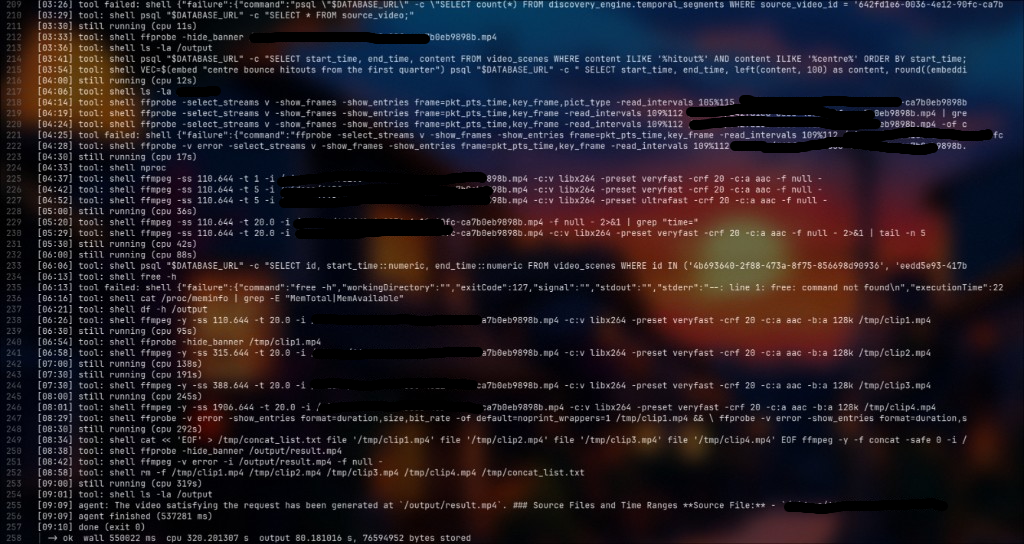
The agent spent 9 to 17 minutes per prompt, with the CPU mostly idle. On average it kept less than half of one core busy: 1,742 CPU-seconds across 4,114 seconds of waiting. Most of that wait is the model thinking between steps. A typical run:
- learned the database layout from scratch, because every run starts fresh;
- worked out how the scene descriptions label the action it needed (for shots,
SCORE TYPEandPLR ATTACK ACTION: Shot At Goal); - searched by keyword and by
embed, often trying several phrasings; - ran one query per candidate moment to decide where each cut should start and end;
- ran trial encodes to choose
ffmpegsettings; - rendered, joined, and checked the final file.
The same moments, ready to watch
Both systems searched the same scenes, so the edits overlap, and the differences are in how those moments are cut.
- Centre bounce hitouts. The same four moments. ION's clips run a few seconds longer, because it pads them and moves each start back to a keyframe, so the cut lands cleanly.
- Shots at goal. ION's ten clips all appear in the agent's edit. Where two shots sat nine seconds apart, ION played them as one continuous clip. The agent kept two overlapping clips.
- Carlton's tackles. The same moments, but handled very differently. ION merged and cleaned up the overlapping footage into one continuous run. The agent used the index's 20-second windows as they stood, so three of its clips cover nearly the same 25 seconds, and the agent replayed that stretch up to three times from repeated clips. The same tackles take 185 seconds in ION's clean edit and 261 seconds in the agent's, padded out by the repeats.
- Jai Newcombe's highlights. Every moment in the agent's 90-second cut is in ION's edit. ION kept sixteen clips, a six-minute reel of the player's game.
- Inside 50 entries. ION returned 20 representative entries, every one of them in the agent's longer list, as a six-minute edit that plays through. The agent kept 57 and produced a 20-minute video.
Where both found the same moments, ION's edits are the tighter ones: ION merged and cleaned up the overlapping footage, while the agent replayed the same stretch several times from repeated clips. Overlaps merged on tackles, cuts settled on keyframes for the centre bounces. On the open prompts, ION stayed with a reel you can watch to the end.
The Cursor agent's rendered edits are here to watch: shots at goal, Newcombe's highlights, Carlton's tackles, the centre bounce hitouts and the inside 50 entries.
Watch ION's edits
These are ION's edits from the benchmark, playing in the ION player. Each is the small virtual MP4 from the results, assembled from the original broadcast as you watch.
Download the results and see for yourself
Every result set from the benchmark is here to download, along with the harness itself. Each holds every prompt's output and its raw logs, prompts, and metrics.json files, so any figure in this article can be traced back to its source.
A second attempt: the Gemini CLI
The Cursor CLI is one off-the-shelf agent. To check that the gap is about the approach and not the particular tool, we ran the same five prompts through a different one, Google's Gemini CLI, on the same Gemini 3.8 Flash model, the same instance, the same scoped index, and the same brief with the 20-clip cap.
| Five different prompts | ION (Gemini 3.8 Flash) | Cursor CLI agent | Gemini CLI agent |
|---|---|---|---|
| Time until the edit could be played | 1 min 47 s | 1 h 8 min 34 s | 1 h 14 min 39 s |
| CPU | 6.2 s | 1,742 s | 1,558 s |
| CPU cost | $0.00008 | $0.023 | $0.021 |
| New storage written | 2.8 MB | 1.65 GB | 3.13 GB |
| Model tokens | 20,879 | 33.8M | 28.6M |
| Model cost | $0.045 | $5.61 | $4.19 |
| Video accuracy | 97% | 89% | 78% |
The two agents land in the same place. Both spend over an hour, both burn more than 1,500 CPU-seconds, both cost dollars per five prompts, all against ION's few seconds and few cents, because both decode and re-encode a new MP4 while ION writes a small virtual file in about 21 seconds. All five Gemini CLI edits were produced and playable: shots at goal, Newcombe's highlights, Carlton's tackles, the centre bounce hitouts and the inside 50 entries.
The one number that moves against the trend is storage: the Gemini CLI wrote almost twice what the Cursor agent did (3.13 GB against 1.65 GB), on less total video. The reason is bitrate, not resolution. Both agents output 1080p H.264, but the Gemini CLI never pinned an encoder bitrate, so ffmpeg defaulted high: its edits ran from 5 Mbps on the one prompt it stream-copied to 26 Mbps on "shots at goal", averaging about 14 Mbps against the Cursor agent's 7. The render path leaves that choice to the agent, and a higher default means a bigger file for the same footage. ION's edit is a reference either way, so its storage does not move.
The Gemini CLI kept to the 20-clip cap: it returned exactly 20 clips on three prompts and fewer on the two smaller ones (18 and 4), never more. The cap is a ceiling, not a target, and the agent treated it that way: on "the centre bounce hitouts from the first quarter" only four moments matched and it returned four, not a padded twenty. Accuracy is scored the same way as the Cursor run, distinct correct clips ÷ clips returned, and lands at 78% (64 distinct moments across 82 returned clips), lower than the Cursor agent's 89%, because the Gemini CLI leaned on near-duplicate index windows: on "Jai Newcombe's highlights" and "Carlton's tackles" several of its clips sit one to three seconds apart and replay the same moment. That is the same repeat problem the Cursor agent showed on the tackles, more pronounced here.
The Gemini CLI also returned more clips than ION on four of the five prompts: 20 against 10 on shots at goal, 20 against 16 on Newcombe, 18 against 9 on Carlton's tackles, and a tie at 20 on inside 50s and at 4 on centre bounces. Two separate things drive that, and they pull in opposite directions.
The first is interpretation, not error. On "every Hawthorn shot at goal" the Gemini CLI read "shot at goal" broadly: its own queries pulled 15 Hawthorn goals plus 10 behinds, and a behind is a shot that missed, so it had more than 20 genuine candidates and capped to 20. ION read the prompt more narrowly and kept the clearest shots, the ten most unambiguous goals rather than every scoring attempt. Both are defensible; the gap is the two systems drawing the line between a "shot at goal" and any scoring attempt in different places, not one of them padding.
The second is repeats, and it is less flattering to the agent. On Newcombe and on Carlton's tackles the extra clips are mostly the same moment returned more than once: the Gemini CLI took the index's overlapping 20-second windows as they stood, so several of its clips sit one to three seconds apart over the same play. ION merged those overlaps into one clean run of each moment, which is why its counts are lower and its edits tighter. So "more clips" means genuinely more coverage on shots at goal, but mostly more duplication on Newcombe and the tackles, the same repeat problem the Cursor agent showed, more pronounced here.
One hundred thousand edits
Average the five different prompts and multiply by 100,000, and the shape of a platform's bill comes into view. The estimate treats further edits as similar to the ones measured here.
Try it yourself: the interactive version of this table has a slider that runs from a single edit to a million, so you can watch the two columns pull apart. A second calculator, by video length, scales the results from a one-minute clip to a week of footage.
| ION | AI agent | Against the agent at a million edits |
|---|
m6i.large on-demand rate
($0.096 per hour, which is $0.048 per vCPU-hour across its 2 vCPUs). "2 vCPUs reserved" prices the
agent's whole m6i.large instance for its whole run time, the way EC2 bills a dedicated
instance. Model cost uses Google's Gemini list prices. Time is total work done one edit after
another, not a waiting time. Storage is priced at S3 Standard ($0.023 per GB per month). Serving
costs are not included.
CPU is priced from the benchmark's own hardware: the AWS EC2 m6i.large on-demand rate of $0.096 per hour, which is $0.048 per vCPU-hour across its 2 vCPUs, taking one CPU-second on the test instance as one vCPU-second. "CPU used" counts only what each system consumed. "2 vCPUs reserved" prices the agent's whole m6i.large instance for the whole run, the way EC2 actually bills a dedicated instance. ION runs as a shared, always-on server, so its cost per request is the CPU it uses.
| Per 100,000 edits | ION | AI agent |
|---|---|---|
| Model cost | $893 | $112,211 |
| CPU cost, CPU used | $1.64 | $464 |
| CPU cost, 2 vCPUs reserved for the agent | - | $2,194 |
| Total, CPU used | $895 | $112,675 |
| Total time, edits run one after another | 596 hours (25 days) | 22,856 hours (2.6 years) |
| CPU time | 34 CPU-hours | 9,676 CPU-hours |
| Model tokens | 418 million | 675 billion |
| Storage added | 56 GB | 33 TB |
| Storage cost per month (S3 Standard, $0.023 per GB) | $1.29 | $760 |
On its everyday Flash-Lite model, ION's model cost for 100,000 edits is about $222, and the total about $223: roughly 500 times less than the agent.
The time row is total work. Running many edits at once shortens the calendar, and the CPU and token bills stay. The agent's storage bill continues for every month those rendered files are kept.
Longer videos, same story
These results come from one long video, and length meets the two systems in different places. Choosing the edit is independent of length: both search an index of scenes. What grows with length is the work after that.
- ION reads more index data from S3 when the source is longer. On a ten-hour recording, about a minute per edit, against 21 seconds here.
- The agent renders a longer edit from longer footage. The same recording, about 24 minutes per edit against 14, and about 1.5 GB of new storage against 330 MB.
Across that range ION stays roughly 20 to 70 times faster. The lead is widest on short videos, where the agent's ten minutes of planning dominate. Both effects can be seen directly in the video-length calculator.
One edit
| ION | AI agent |
|---|
100,000 edits of videos this long
| ION | AI agent |
|---|
Keeping the video in the library (once per video)
| ION | AI agent |
|---|
- Choosing the edit (search and the model calls) takes the same time and tokens whatever the video's length: both systems search an index of scenes, not the footage.
- ION writing the edit reads the source's index structures from S3, which grow with the video. About 6% of the measured time is fixed overhead; the rest is scaled with the source's length.
- Edit length grows with the source, kept at the same share as measured: 3.2% for ION and 4.8% for the agent, at least 10 seconds and never longer than the source.
- The agent's search is kept at its measured length. On a much longer source it would have more scenes to query, so its real time there would be longer than shown.
- The agent's rendering CPU and storage grow with the edit's length, at the measured 0.93 CPU-seconds and 0.88 MB per second of output. Its model loop is kept at the measured 10.8 minutes per edit; rendering adds its CPU time spread over two vCPUs.
- ION's storage grows with the edit's length, at the measured 2.2 KB per second of output.
m6i.large CPU at $0.048 per
vCPU-hour ($0.096 per hour across 2 vCPUs) and S3 Standard at $0.023 per GB per month. Real footage
varies; treat this as an illustration of how the
two approaches scale, not a quote.
Making an edit, then serving it
The table above is the cost of making an edit. After that, the bills split. The agent has already paid in render time, CPU, and a new file for every edit. ION writes kilobytes at creation and streams the source when someone presses play. Platforms that assemble edits from existing segments (Clips, ad insertion, and ION) take that trade on purpose. Creation stays cheap and repeatable at volume, and serving is tuned on its own. The 38× gap is a result about creation.
Reference or render
There are two ways to turn a request into video.
| Understand and render | Index and reference | |
|---|---|---|
| Who does it | An AI agent; AI clipping tools; a person editing and re-uploading | ION; YouTube Clips; server-side ad insertion |
| Work per edit | Search, cut, decode, re-encode | A search query plus a small playlist or virtual file |
| Storage per edit | A whole new video (on a platform, a new ladder of copies) | Kilobytes |
| Where the cost falls | Generating each edit | Creating each edit, with serving tuned separately |
A platform building "prompt to edit" would work the way ION does.
- Search a scene index, with a model to rank and judge the results.
- Assemble a playlist that points at existing segments of one or more videos, as YouTube Clips and ad insertion already do. Cuts snap to segment or keyframe boundaries, the same way
createTimedMp4moves each start back to a keyframe. - Serve the edit from segments already in the edge caches.
A frame-exact cut is where a platform still renders. Everywhere else, the edit is a reference.
ION sits on that side of the table, beside the design a large platform already uses for clips and ads. The platform version of a prompted edit has no public bill. The render path does, and it is what anyone with footage, a model, and ffmpeg does today. That path is the agent.
The clock in this article stops when the edit exists and can be played, on the same line for both systems. Ingest, the library, and the cost of each later view are real parts of running video, and they sit outside the 38× result. This run started from footage that was already stored and indexed, and the index matters: in earlier runs without it the agent spent most of its time just finding footage, and giving it the same index ION uses cut a typical run by about two thirds. Even so, the comparison is edit production: prompt in, finished video out.
Appendix: method, data, and how to repeat it
This appendix is for anyone who wants to check a figure or run the comparison again: the design, the software and prices, the formulas, and the steps.
Study design
| Item | Detail |
|---|---|
| Question | How much does it cost to make an edit by referencing indexed footage, compared with rendering it? |
| Systems compared | ION (index and reference) and an unmodified Cursor CLI agent with ffmpeg (understand and render) |
| Held constant | Footage, scene index, search scope, hardware, AWS region, model, prompts |
| Measured | Time to a playable edit, CPU time, peak memory, new storage, model tokens, model cost, video accuracy |
| Derived | Per-minute-of-output figures, costs at volume, scaling by source length |
| Material | One 2 h 10 min 41 s AFL broadcast (4.8 GB, 2,799 indexed scenes) |
| Sample | Five different prompts, recorded on both systems |
| When | 1 and 2 October 2026 |
Software, models, and prices
| Component | Version or setting |
|---|---|
| Machines | AWS EC2 m6i.large (2 vCPUs, 8 GB), one region; the agent's on Ubuntu 24.04 with Docker |
| Database | Amazon RDS for PostgreSQL with the pgvector extension |
| Footage access | Mountpoint for Amazon S3 on both machines; read-only on the agent's |
| Agent | Cursor CLI 2026.09.28, headless, model pinned to Gemini 3.8 Flash |
| Agent tools | psql, ffmpeg and ffprobe 5.1.9, and the embed command |
| ION's models | Gemini 3.8 Flash for understanding the prompt and judging scenes |
| Embeddings | gemini-embedding-001 on both sides |
Model prices are Google's public list prices per million tokens, from benchmark/pricing.json:
| Model | Input | Cached input | Output |
|---|---|---|---|
| Gemini 3.8 Flash | $0.75 | $0.075 | $3.75 |
| Gemini 3.1 Flash-Lite | $0.25 | $0.025 | $1.50 |
Infrastructure prices: AWS EC2 m6i.large on-demand at $0.096 per hour ($0.048 per vCPU-hour across its 2 vCPUs), and S3 Standard storage at $0.023 per GB per month.
How the agent's database access was scoped
The agent connects with a read-only login, bench_ro, that can see only two views. Each view is a filtered window onto ION's real tables, so nothing is copied and nothing changes for ION:
CREATE SCHEMA bench_hawthorn;

CREATE VIEW bench_hawthorn.source_video AS
    SELECT * FROM discovery_engine.source_video
    WHERE id = '642fd1e6-0036-4e12-90fc-ca7b0eb9898b';

CREATE VIEW bench_hawthorn.video_scenes AS
    SELECT * FROM discovery_engine.video_scenes
    WHERE source_video_id = '642fd1e6-0036-4e12-90fc-ca7b0eb9898b';

REVOKE SELECT ON ALL TABLES IN SCHEMA discovery_engine FROM bench_ro;
REVOKE USAGE ON SCHEMA discovery_engine FROM bench_ro;
GRANT USAGE ON SCHEMA bench_hawthorn TO bench_ro;
GRANT SELECT ON ALL TABLES IN SCHEMA bench_hawthorn TO bench_ro;
In the recorded runs, every attempt by the agent to read ION's real schema failed with permission denied for schema discovery_engine.
How every derived figure is calculated
- Ratios ("about 38×") are the recorded totals divided, then rounded.
- Per edit figures are the recorded totals divided by the number of prompts.
- Per minute of output divides each total by the minutes of finished video that system produced.
- Model cost is input tokens × input price, plus cached input tokens × cached price, plus output tokens × output price, using the table above for both sides.
- CPU cost is CPU-seconds ÷ 3,600 × $0.048 (the
m6i.largerate of $0.096/hour split across its 2 vCPUs). "2 vCPUs reserved" uses 2 × the agent's run time, i.e. the whole instance. - At scale multiplies the per-edit figures by the number of edits. Storage cost is the added gigabytes × $0.023 per month.
- Video accuracy is distinct correct clips ÷ clips returned, scored by watching every clip in each edit. A repeat (a moment already shown) and an extra (a clip that does not match the request) both count towards the denominator but not the numerator. One clip is a known labelling error in the index, a scene mis-tagged as a shot at goal and another as a tackle; both systems returned it because both trust the same index, so it is deducted from both scores, not treated as a retrieval failure. The overall figures are the summed numerators over the summed denominators (ION 57/59, agent 80/90). ION's clip list comes from its
clips.json; the agent's from itsffmpegcut ranges and its final answer. ION caps an edit at 20 decisions, so on prompts with more than 20 true moments it returns a representative subset by design, which lowers neither its accuracy (every returned clip is still scored) nor counts against it as a miss.
The video-length calculator splits each per-edit figure into a part that stays fixed, a part that grows with the source length L, and a part that grows with the edit length E. The measured source is L₀ = 7,841 seconds.
| Quantity | ION | AI agent |
|---|---|---|
| Edit length E | 3.2% of L (measured share) | 4.8% of L (measured share) |
| Choosing the edit | 8.1 s, fixed | Part of the model loop below |
| Writing or rendering the edit | W × (0.06 + 0.94 × L ÷ L₀), with W = 13.4 s over S3 or 0.9 s when the index is read locally | 0.93 CPU-s × E ÷ 2 vCPUs |
| Model loop | - | 648.6 s (10.8 min), fixed |
| Storage | 2.2 KB × E | 0.88 MB × E |
| Tokens and model cost | Fixed at the measured per-edit average | Fixed at the measured per-edit average |
E is at least 10 seconds and at most L. The calculator can also hold E at one length for both systems. It marks the source length where the two time formulas meet. The lines are linear extrapolations from one source video, drawn to show how the two approaches scale.
Running it again
- Prepare the footage. Upload the video to ION so it is analysed and indexed as usual. Copy the same source file into a dedicated S3 bucket under
source/, using the source video's file name rather than its UUID, so the agent can open it directly. - Launch the agent's instance. Use the same instance type and region as ION's server, with an IAM role that can read the bucket, and allow it through the database security group. Copy
benchmark/onto the instance and runsudo ./setup-agent-instance.sh, which installs Docker,ffmpeg,psql, and Mountpoint, mounts the bucket read-only, and builds the agent's image. - Scope the database. Create the read-only
bench_rologin and run the SQL above. - Match the models. Set ION's prompt and judge models to the agent's model, and restart ION.
- Fill in the settings. Copy
staging.env.exampleandagent-instance.env.example, and fill in the API URLs, the database login, the Cursor API key, and the scope. ION's catalog scope and the agent's source video IDs name the same videos. - Run ION on its server:
source staging.env && RUN_ID=<name> ./run-ion.sh. - Run the agent on its instance:
source agent-instance.env && RUN_ID=<name> ./run-cursor.sh. For the second attempt with the Gemini CLI, fill ingemini-instance.env.examplethe same way and runsource gemini-instance.env && RUN_ID=<name> ./run-gemini.sh. Run one system at a time, so they take turns on the database. - Collect the results. Copy each machine's
runs/<name>/folder back. Every summary figure in this article can be recomputed from themetrics.jsonfiles and the raw logs beside them. - Close the instance. Drop the schema and login, remove the security group rule, terminate the instance, and restore ION's usual models.
Glossary
- Agent. A program that lets an AI model run commands, read the results, and choose the next step, in a loop, until the task is done.
- CPU-second. One second of one processor core. Two busy cores for one second are two CPU-seconds.
- Embedding. A list of numbers that stands for the meaning of a piece of text. Similar meanings sit near each other, which is what makes search by meaning possible.
- Index (scene index). The descriptions and embeddings ION writes for every scene of about 20 seconds when a video is uploaded. Both systems search it.
- Mountpoint for S3. AWS software that makes an S3 bucket appear as a folder on a server.
- pgvector. A PostgreSQL extension that stores embeddings and finds the nearest ones.
- Render (re-encode). Decode video frames and compress them again into a new file. It spends CPU and writes a new copy of the footage.
- Token. The unit AI models read and write, roughly three quarters of a word. Providers charge per token.
- Virtual MP4. ION's edit: a small file listing which parts of which source videos to play. A playable MP4 is assembled from those parts when someone watches.
The harness
Everything lives in IONVideoDeployments/benchmark/:
benchmark/
  prompts-hawthorn.tsv         the prompt list: <prompt_id> TAB <prompt>
  lib.sh                       shared code: prompt loop, output layout, ffprobe check, CPU and memory reads
  run-ion.sh                   ION runner
  run-cursor.sh                Cursor CLI agent runner
  run-gemini.sh                Gemini CLI agent runner (the second attempt)
  staging.env.example          settings for run-ion.sh on ION's API server
  agent-instance.env.example   settings for run-cursor.sh on the agent's instance
  gemini-instance.env.example  settings for run-gemini.sh on the agent's instance
  setup-agent-instance.sh      prepares the agent instance: Docker, the S3 mount, the agent images
  pricing.json                 Google list prices used for both sides
  cursor-agent/                the Cursor CLI agent image and its in-container runner
    Dockerfile
    task-template-indexed.txt  the agent's task (see "The exact brief the agent gets")
    embed, embed-server.py     the agent's embed command, and the proxy that holds the Google key
    run-benchmark.sh           runs inside the container: the agent plus in-container measurements
  gemini-agent/                the Gemini CLI counterpart, same layout as cursor-agent/
    Dockerfile
    task-template-indexed.txt
    embed, embed-server.py
    run-benchmark.sh
run-ion.sh, for each prompt:
- sends one unrecorded warm-up prompt, the way a real user meets a server that is already up;
- posts the prompt to ION's orchestration endpoint, timestamping every event as it arrives;
- turns ION's edit decisions into a clip list;
- calls
createTimedMp4with those clips, and the clock stops here; - records CPU, memory, storage, and the player link for the new edit.
run-cursor.sh, for each prompt:
- checks that the database, the embedding proxy, and the footage are reachable;
- starts a fresh agent container with the footage read-only, the read-only database login, and an empty output folder;
- inside the container,
run-benchmark.shstarts the agent with the task, prints a progress line per event, and on exit records CPU, peak memory, leftover files, and token usage; - checks
result.mp4withffprobeand removes the container.
Each run writes a metrics.json with the same top-level fields for both systems (wall_time_ms, cpu_seconds, memory_peak_bytes, output.stored_bytes, output.duration_seconds, llm), next to the raw logs it was computed from:
runs/<RUN_ID>/
  results.ndjson                one line per run
  ion/<prompt_id>/rep-<n>/      metrics.json, the orchestration events, clips.json, ION's response
  cursor/<prompt_id>/rep-<n>/   metrics.json, the agent's full event log, result.mp4
Coming soon: benchmarking remote video virtualization
This benchmark kept the footage on the same machines that did the editing. The next one moves the source out from under the editor: we are measuring remote video virtualization, where ION assembles an edit that references footage sitting in storage somewhere else entirely, and streams it without first pulling the whole file across. We will time it the same way, prompt in to playable edit out, and publish the receipts alongside it. Coming soon.